
If you’ve been searching for how to install XCIPTV on Firestick, you’re in the right place.
XCIPTV has become one of the most popular IPTV players for Fire TV devices. It’s clean, fast, and built specifically for streaming live TV and VOD smoothly.
In this guide, I’ll walk you through:
- How to install XCIPTV APK on Firestick
- How to set it up using Xtream Codes login
- Common problems and quick fixes
- How to make it work smoothly on Firestick 4K, 4K Max, Lite, and Cube
Whether you’re completely new to IPTV or you’ve installed apps before, this guide keeps things simple.
What Is XCIPTV and Why Do People Use It?
Let’s clear this up first.
XCIPTV is an IPTV player.
It does not come with channels.
Think of it like a media player. You connect it to your IPTV subscription, and it organizes everything — live TV, movies, series, and EPG — into a clean interface.
Why people love it:
- Supports Xtream Codes API login
- Works with M3U playlists
- Built-in video players (fast and stable)
- Clean, remote-friendly interface
- EPG support (TV guide)
Many IPTV users pair XCIPTV with reliable services like Ottzon, which provide the actual content. The app is just the player — your subscription provides the streams.
Before You Install XCIPTV APK on Firestick
Because XCIPTV is not available in the Amazon App Store, you’ll need to sideload it.
Don’t worry. It takes 2 minutes.
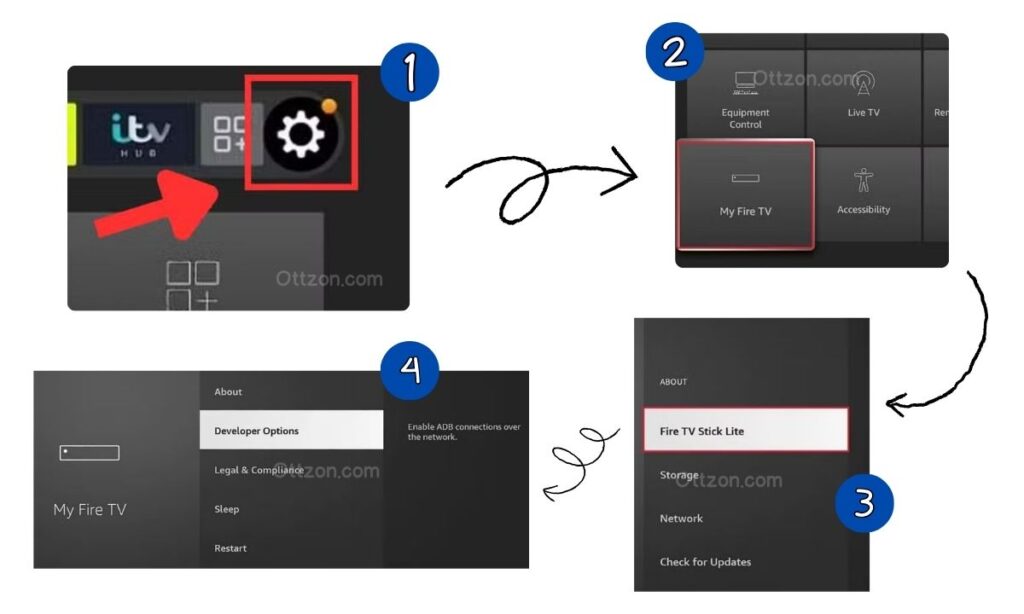
Enable Apps from Unknown Sources
- Go to Settings
- Click My Fire TV
- Select Developer Options
If you don’t see Developer Options:
- Go to About
- Click your Firestick name 7 times
- Developer Options will appear
Now:
- Click Install Unknown Apps
- Turn ON Downloader
How to Install XCIPTV on Firestick Using Downloader
This is the simplest and safest method.
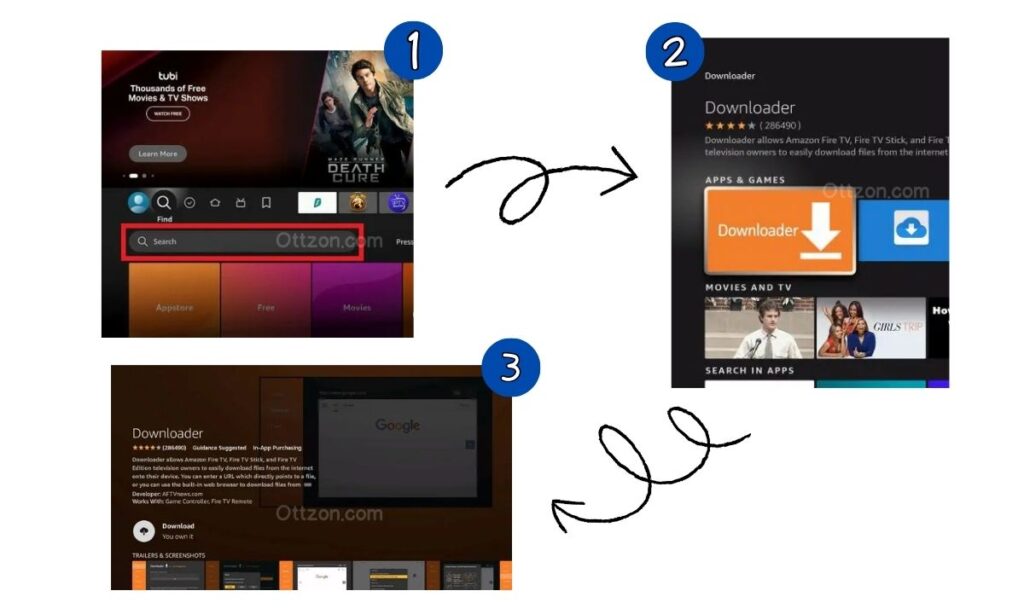
Step 1: Install Downloader App
- Go to the Firestick Home screen
- Select Find
- Click Search
- Type Downloader
- Install it
Step 2: Open Downloader
- Launch Downloader
- Click Allow
- Click OK
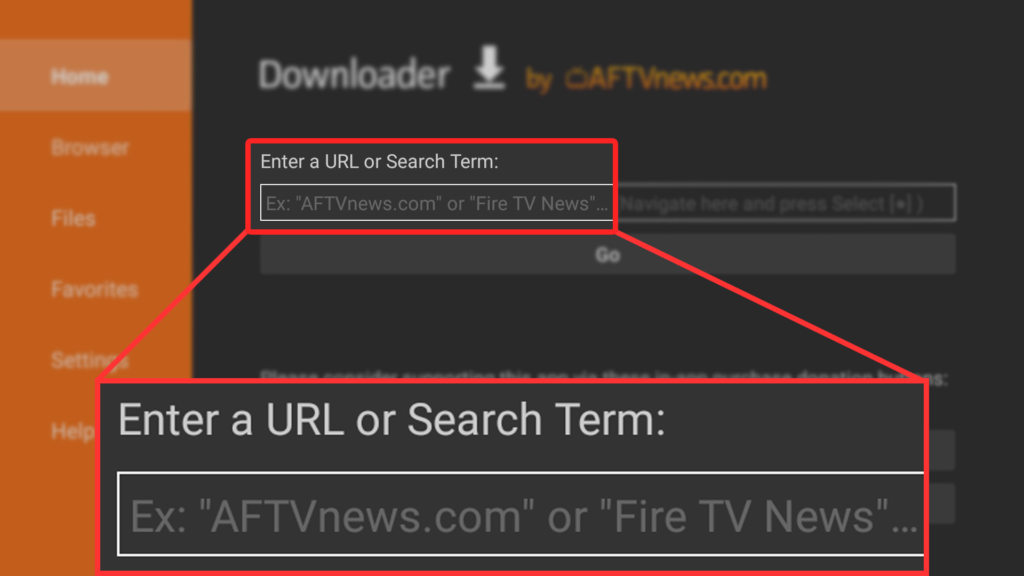
Step 3: Download XCIPTV APK
In the URL box, enter XCIPTV APK Downloader code.
Click Go
The file will begin downloading.
Step 4: Install XCIPTV
Once downloaded:
- Click Install
- Wait for installation to complete
- Click Done
You can delete the APK file to save space.
Step 5: Launch XCIPTV
Go to:
- Apps & Channels
- Open XCIPTV Player
You’ve successfully installed XCIPTV on Firestick.
How to Set Up XCIPTV on Firestick (Xtream Codes Login)
Now the important part.
You’ll need 3 things from your IPTV provider:
- Username
- Password
- Server URL
If you’re using Ottzon, these details are provided immediately after subscription.
Setup Steps:
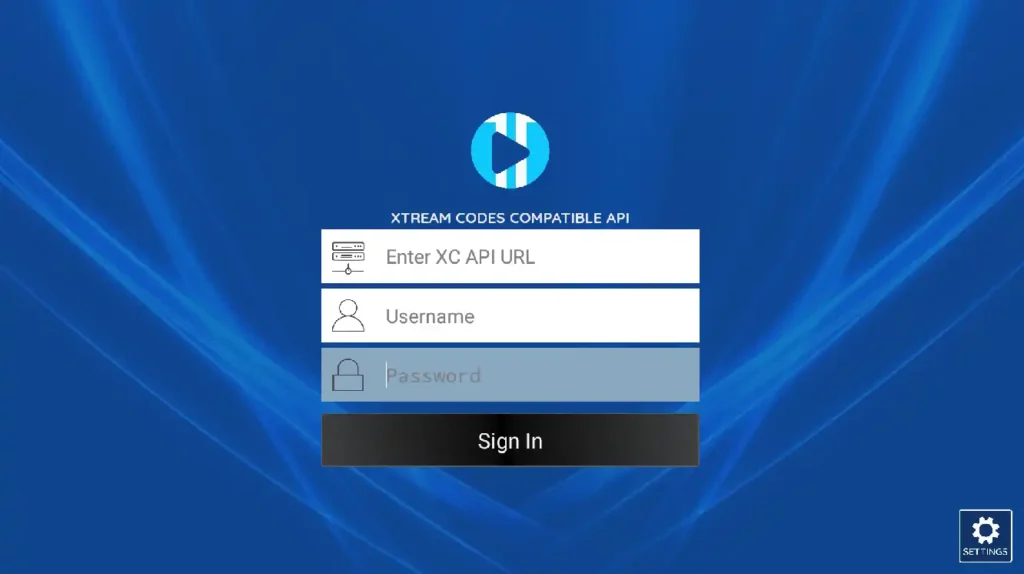
- Open XCIPTV
- Select Login with Xtream Codes API
- Enter:
- Any Name (Example: Ottzon)
- Username
- Password
- Server URL
- Click Login
The app will now:
- Download Live TV
- Load Movies & Series
- Sync EPG
Give it a minute.
That’s it.
You’re ready to stream.
Common Problems & Fixes
Even simple installs can hit small issues. Here’s how to fix them.
XCIPTV Not Installing
- Check Firestick storage
- Restart device
- Re-download APK
App Not Installed Error
This usually means:
- Corrupt APK
- Wrong version
Download a fresh copy from your IPTV provider.
XCIPTV Not Loading Channels
99% of the time:
- Username or password is wrong
- Server URL is incorrect
Double-check credentials.
Buffering Issues
Usually not an app problem.
Try:
- Restarting router
- Using Ethernet adapter
- Closing background apps
Black Screen or Freezing
- Force stop app
- Clear cache
- Restart Firestick
Is XCIPTV Compatible with Firestick 4K, 4K Max & Lite?
Yes.
XCIPTV works on:
- Firestick Lite
- Firestick 4K
- Firestick 4K Max
- Fire TV Cube
The 4K Max performs the best due to better RAM and processor.
Final Thoughts
Installing XCIPTV on Firestick is simple once you know the steps.
To recap:
- Enable Unknown Apps
- Install Downloader
- Download XCIPTV APK
- Install
- Login with Xtream Codes
The app itself is powerful and smooth. But remember — your experience depends heavily on the IPTV provider you use.
If you’re looking for a reliable IPTV subscription to pair with XCIPTV, check out our IPTV subscription page and explore our available packages.
A great player deserves a great service behind it.
Frequently Asked Questions (FAQ)
Is XCIPTV free?
Yes, the app itself is free. You only pay for an IPTV subscription.
Do I need a Downloader code for XCIPTV?
Not necessarily. You can enter a direct APK URL in Downloader.
Why is XCIPTV not in the Amazon App Store?
Because it’s a third-party IPTV player.
Can I use M3U instead of Xtream Codes?
Yes. XCIPTV supports both login types.
Does XCIPTV work worldwide?
Yes. As long as your IPTV provider supports your region.