
If you already have IPTV access but aren’t sure how to watch it on your computer, VLC Media Player might be the easiest solution available.
Most people use VLC to play movies or music files. But here’s something many users don’t realize: VLC can also stream live television using IPTV playlists.
With a simple M3U playlist link, you can turn your Windows or Mac computer into a powerful IPTV player in just a few minutes.
In this guide, you’ll learn:
- How to watch IPTV on VLC player
- How to load an IPTV M3U playlist
- Simple tips to improve streaming performance
- Common issues and how to fix them
Even if you’re completely new to IPTV, don’t worry. The setup is straightforward.
What You Need Before Watching IPTV on VLC
Before starting your IPTV VLC setup, make sure you have these three things ready:
1. VLC Media Player
VLC is a free and open-source media player that works on:
- Windows
- macOS
- Linux
If you don’t have it installed yet, download the latest version from the official VLC website.
2. An IPTV M3U Playlist Link
Your IPTV provider will usually give you a playlist link (M3U).
This link contains the list of channels that VLC will stream.
3. Stable Internet Connection
Since IPTV streams live content over the internet, your connection needs to be stable.
Recommended speed:
- Minimum: 10 Mbps
- Better experience: 20 Mbps or higher
Once you have these ready, you’re good to go.
Why VLC Player Works Well for IPTV
There are many IPTV apps available today, but VLC remains one of the simplest and most reliable tools.
Here’s why many IPTV users still choose VLC:
- Supports M3U and M3U8 playlists
- Works on Windows and Mac
- No additional plugins required
- Lightweight and fast
- Completely free
For beginners or intermediate IPTV users, VLC is often the fastest way to start watching IPTV on a PC.
How to Watch IPTV on VLC Player (Windows and Mac)
Let’s walk through the exact steps to watch IPTV on VLC player using an M3U playlist link.
Step 1: Install or Update VLC Media Player
If VLC isn’t installed yet:
- Download VLC from the official VideoLAN website
- Install it on your computer
- Open the application
If VLC is already installed, make sure you’re running the latest version to avoid compatibility issues with IPTV streams.
Step 2: Open the Network Stream Option
Once VLC is open:
- Click Media in the top menu
- Select Open Network Stream
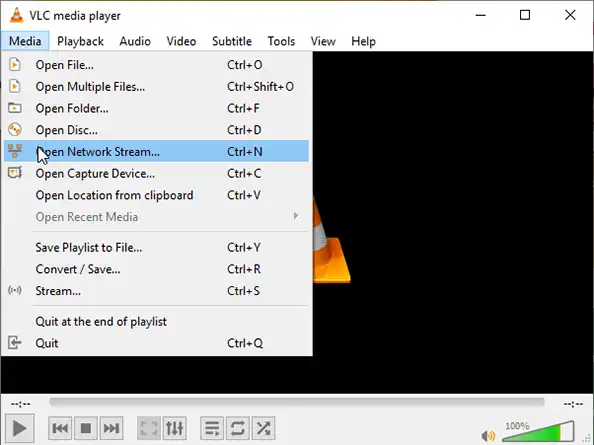
This feature allows VLC to stream video directly from internet sources.
Step 3: Add Your IPTV M3U Playlist Link
You will now see a field labeled Network URL.
Follow these steps:
- Paste your IPTV M3U playlist link
- Click Play
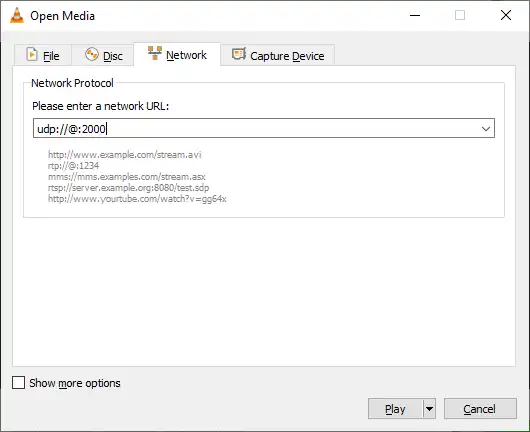
VLC will begin loading the IPTV stream. Depending on the playlist, it may automatically start playing the first available channel.
Step 4: Open the IPTV Channel List
To see all available channels in your playlist:
- Click View
- Select Playlist
Or simply press:
Ctrl + L (Windows)
The full list of channels will appear on the side panel. From there, you can:
- Browse channels
- Double-click any channel to start watching
And just like that, you’re watching IPTV on VLC.
Tips to Improve IPTV Streaming on VLC
Sometimes IPTV streams may buffer or load slowly. Here are a few practical tips to improve your experience.
Adjust VLC Network Cache
Increasing the network cache can reduce buffering.
To change it:
- Go to Tools
- Click Preferences
- Select Input / Codecs
- Increase Network caching to 1000–1500 ms
This gives VLC more time to load the stream smoothly.
Use a Reliable IPTV Provider
Free playlists often stop working or become unstable.
A good IPTV provider offers:
- Stable servers
- Regular playlist updates
- Better streaming quality
For example, Ottzon IPTV provides reliable playlists with thousands of channels, movies, and sports streams.
Check Your Internet Speed
If channels constantly buffer, run a quick speed test.
For smooth IPTV playback:
- 10 Mbps works for HD
- 20+ Mbps works better for multiple streams
FAQ
Can VLC play IPTV playlists?
Yes. VLC fully supports IPTV playlists, including M3U and M3U8 formats. Simply paste the playlist link into the Network Stream option.
Why is my IPTV playlist not working in VLC?
Common reasons include:
- Expired playlist link
- IPTV server downtime
- Slow internet connection
- Outdated VLC version
Can I watch IPTV on VLC on Mac?
Yes. The setup process on macOS is identical to Windows. VLC works the same way on both platforms.
Is VLC a good IPTV player?
VLC is great for basic IPTV streaming. However, dedicated IPTV apps may offer extra features like:
- Electronic Program Guide (EPG)
- Recording options
- Channel categories
What is an M3U IPTV playlist?
An M3U playlist is a file or link containing streaming URLs for IPTV channels. VLC reads this list and plays the channels from the internet.
Do I need a subscription for IPTV?
Some IPTV playlists are free, but they are often unreliable. Most users prefer a paid IPTV service because it offers:
- More channels
- Stable streaming
- HD and 4K quality
- Better uptime
Conclusion
Watching IPTV on VLC player is one of the simplest ways to stream live TV on a computer.
All you need is:
- VLC Media Player
- An IPTV M3U playlist link
- A stable internet connection
Within minutes, your Windows or Mac computer becomes a complete IPTV streaming device.
If you’re looking for a stable IPTV service with thousands of channels, movies, and sports, you can explore the subscription options available at Ottzon.
Visit ottzon.com to discover the available plans and start streaming today.