
Choosing an IPTV service without testing it first is like buying a car without a test drive.
You don’t know how fast it loads.
You don’t know if it buffers.
You don’t know if your favorite channels even work.
That’s why searching for an IPTV free trial is the smart move.
If you’re considering Ottzon, the good news is simple: you can get a 24-hour IPTV free trial and test everything before committing.
In this guide, I’ll show you exactly how to get the Ottzon IPTV free trial, how to set it up on any device, and what you should test during those 24 hours.
Let’s get started.
What Is an IPTV Free Trial (And Why You Should Always Test First)
An IPTV free trial gives you temporary access to a provider’s service — usually 24 hours — so you can test quality, channels, and performance.
Why does this matter?
Because IPTV quality depends on:
- Your internet speed
- Server stability
- Device compatibility
- App performance
Two services might look identical on paper. One works perfectly. The other buffers every five minutes.
A free trial removes the guesswork.
Whether you’re a beginner trying IPTV for the first time or an experienced user comparing providers, testing first saves time and money.
About Ottzon’s 24-Hour IPTV Free Trial
Ottzon offers a 24-hour IPTV free trial designed to let users test the service before purchasing a subscription.
Here’s what you get:
- Full access for 24 hours
- No credit card required
- Works on all major devices
- Login via M3U URL or Xtream Codes
- Compatible with IPTV Smarters, TiviMate, Smart IPTV, and more
It’s built for flexibility. Whether you’re using a Firestick, Android TV, Smart TV, iPhone, or tablet — the trial works.
Now let’s walk through how to get it.
Step-by-Step: How to Get the Ottzon IPTV Free Trial
Getting the IPTV free trial is straightforward. It takes less than two minutes.
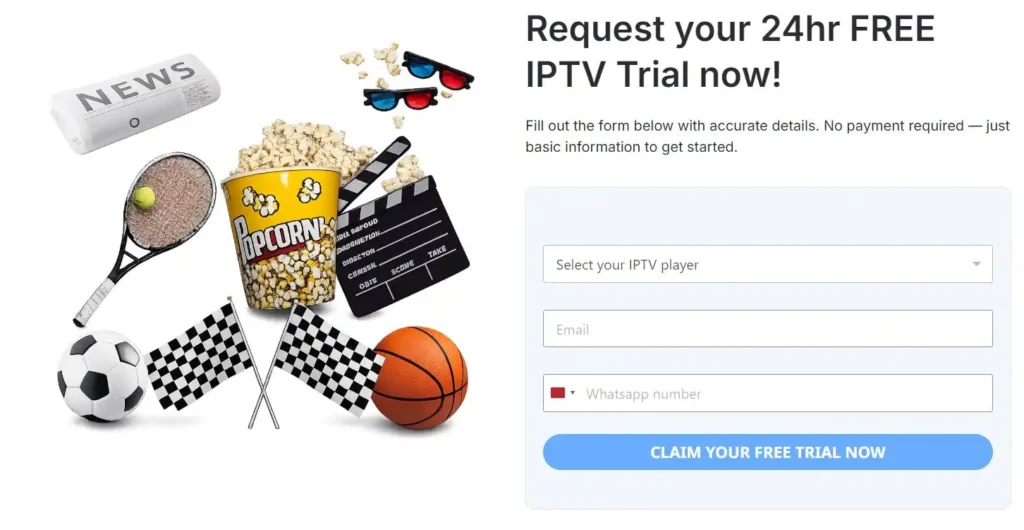
Step 1: Visit the Ottzon Free Trial Page
Go to the official Ottzon website and navigate to the 24-hour IPTV free trial page.
You’ll see a simple request form.
Step 2: Fill Out the Trial Form
You’ll need to provide:
- Your email address
- Your phone number
- The IPTV app you plan to use
Make sure your email is correct. That’s where your login credentials will be sent.
Step 3: Select Your IPTV Player App
Ottzon allows you to choose the app you’ll use, such as:
- IPTV Smarters Pro
- TiviMate
- Smart IPTV
- Other compatible players
This helps them send the correct format (M3U or Xtream Codes login).
Step 4: Submit and Wait for Login Details
After submitting the form, you’ll receive:
- Username
- Password
- Server URL (for Xtream Codes)
or - M3U Playlist URL
Credentials are typically sent via email or WhatsApp.
Step 5: Log In and Start Streaming
Once you receive your credentials, you can enter them into your IPTV app and begin streaming immediately.
That’s it.
Now let’s set it up on your device.
How to Set Up Your IPTV Free Trial on Any Device
Option 1: IPTV Smarters (Android, iPhone, Smart TV)
IPTV Smarters is one of the most popular IPTV apps.
How to Set It Up:
- Download IPTV Smarters Pro from your device’s app store.
- Open the app.
- Select Login with Xtream Codes API.
- Enter:
- Any name (example: Ottzon Trial)
- Username
- Password
- Server URL
- Click Add User.
Channels will load automatically.
Option 2: Firestick Setup (Step-by-Step)
Using a Firestick? Here’s how:
- Install the Downloader app from the Amazon App Store.
- Enable Apps from Unknown Sources in settings.
- Use Downloader to install IPTV Smarters.
- Open IPTV Smarters.
- Enter your Xtream Codes login details.
Within minutes, you’ll have full access to your IPTV free trial.
Option 3: TiviMate (Android TV Users)
TiviMate is popular among advanced IPTV users.
Setup Steps:
- Install TiviMate from the Play Store.
- Open the app.
- Select Add Playlist.
- Choose:
- Xtream Codes login
or - M3U Playlist
- Xtream Codes login
- Enter your credentials.
- Wait for channels to load.
Done.
What to Test During Your 24-Hour IPTV Free Trial
Don’t just scroll randomly. Test smart.
Here’s what you should check:
1. Channel Loading Speed
Do channels open instantly or take 10–15 seconds?
2. HD and 4K Quality
Switch between HD and Full HD channels.
Check clarity during live sports.
3. Sports Performance
Live sports reveal buffering issues quickly.
Test during peak hours.
4. EPG (TV Guide)
Is the program guide accurate and loading properly?
5. Stability at Night
Evening is peak time.
If it runs smoothly then, that’s a good sign.
Use the full 24 hours wisely.
Common Problems (And Quick Fixes)
Buffering?
- Restart your router.
- Use a wired connection if possible.
- Close background apps.
Login Not Working?
- Double-check username/password.
- Make sure there are no extra spaces.
- Confirm server URL is entered exactly.
Channels Not Loading?
- Refresh playlist.
- Restart the app.
Most issues are minor and easily fixed.
FAQ – IPTV Free Trial Questions
Is the Ottzon IPTV free trial really free?
Yes. The 24-hour IPTV free trial does not require payment.
Do I need a credit card?
No.
How long does it take to receive login details?
Usually shortly after submitting the request form.
Can I use the trial on multiple devices?
You can log in on compatible IPTV apps, depending on account limitations.
What happens after 24 hours?
Access expires. You can then choose to purchase a subscription if satisfied.
Final Thoughts: Test First, Then Decide
Searching for an IPTV free trial is the smartest way to choose a provider.
Instead of guessing, you test.
Instead of hoping, you see the quality yourself.
Ottzon’s 24-hour IPTV free trial gives you full access, works on all major devices, and requires no payment to try.
If you’re curious about performance, channel selection, or streaming quality — don’t overthink it.
👉 Claim your 24-hour IPTV free trial from Ottzon today and experience it yourself.
Test it properly. Explore the channels. Check the quality.
Then decide with confidence.